What Nexus is
Nexus watches your boat around the clock and tells you when something needs you: a dragging anchor, water coming aboard, a ship closing in, a person overboard. It brings your instruments, charts, tides and weather together on the phones, tablets and watches you already have.
It is an aid to watchkeeping. In the app's own words, it is not a substitute for a proper lookout, good seamanship or official charts. Keep your charts, your safety equipment and a good lookout, exactly as you would without it. The Terms of Service set this out in full.
Warning: Any alarm can fail to sound. A phone that is switched off, out of battery or out of signal can't hear the boat, and a boat with no power can't raise anything. Treat Nexus as one more set of eyes, never the only one.
The five-minute check
Do this once, on the boat, before you count on Nexus.
1. Let alarms reach your phone
The first time you open the Home screen after setting up your boat, Nexus explains Alarms from your boat and asks to send you notifications. It asks again when you set the anchor.
- Tap Continue.
- Allow notifications.
- On an iPhone, also allow Critical Alerts. These are what let a dragging anchor or a man overboard sound when your phone is on silent or in a Focus.
If you tapped Not now, the Anchor and Alerts screens say Alarms can't reach this phone while it's locked yet. Tap Turn on.
If notifications were turned off later:
- iPhone: open Settings › Apps › Nexus › Notifications (on older iPhones, Settings › Nexus › Notifications). Turn on Allow Notifications and Critical Alerts.
- Android: on the Anchor or Alerts screen, tap Open settings. Or open Settings › Apps › Nexus › Notifications yourself. Make sure Anchor Alarm (Critical) is on; it is allowed to break through Do Not Disturb.
2. Check your alarm volume
On the Home screen, open Alerts, then tap Settings at the bottom. The Alert settings page opens.
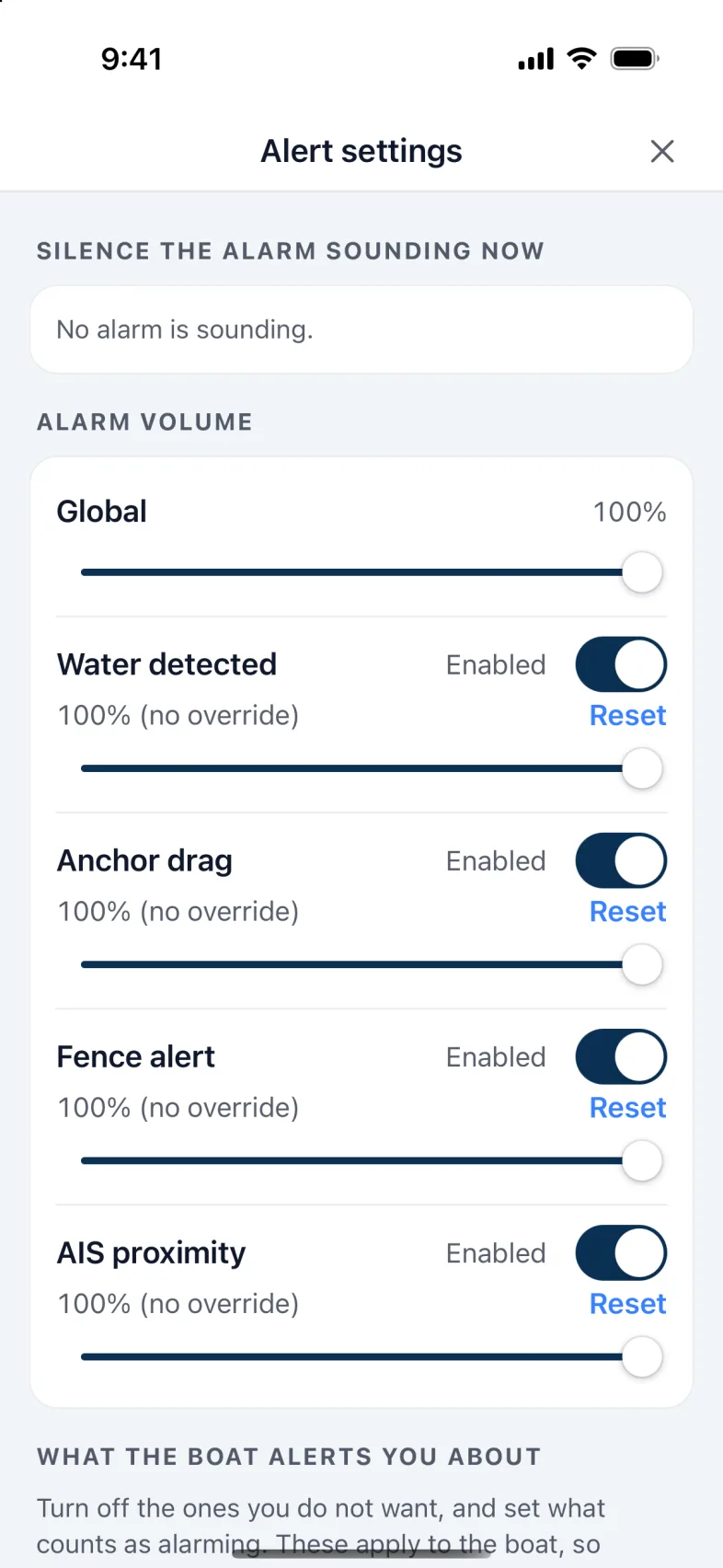
- Under Alarm volume, Global sets how loud every alarm is on this phone. Below it, each alarm has its own volume.
- Each alarm has its own switch. If you turn one off or turn it all the way down, the Anchor and Alerts screens tell you, so it can't happen by accident.
- A man overboard always sounds, at least at half volume, whatever these are set to.
3. Enter your boat's details
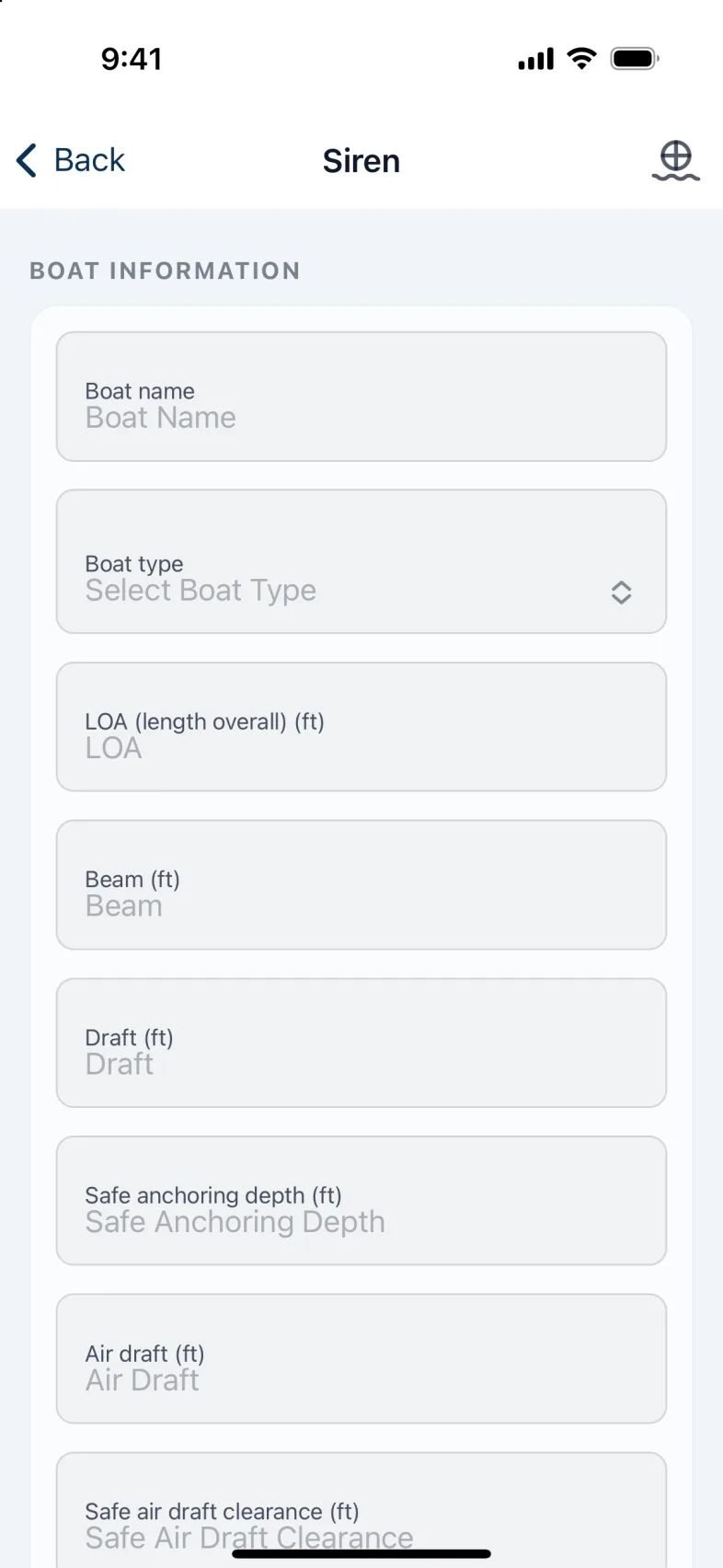
Open Settings, then My boats, then your boat. Fill in at least:
- Draft and Air draft (your mast or highest point above the water). Automatic routes won't plan without them, and bridge warnings compare every bridge against your air draft.
- Safe air draft clearance: how much room you want above the mast at a bridge.
- Boat type: sail or power, a catamaran of either, or other. When you call a bridge, Nexus says "sailing vessel" or "motor vessel" from it.
- Safe anchoring depth, LOA and, if you have AIS, your MMSI.
Tap Save to the boat. The details live on the boat, so every phone aboard uses the same numbers. Only an owner can change them.
You can save only while this is the boat you're using and it is answering. If it isn't, the page shows the details it last saw, and you can't change them. To use another boat, open its page and tap Select this boat.
4. Know how your phone reaches the boat
The small icon at the top of every screen shows how this phone is talking to your boat:
- Green Wi-Fi: Direct. On the boat's own Wi-Fi, talking to the boat directly. No internet needed.
- Blue cloud: Cloud. Away from the boat, reaching it over the internet.
- Wi-Fi with a line through it: can't reach the boat. This phone won't hear the boat's alarms until it answers again. Tap the icon to see when the boat was last heard.
- Faded grey Wi-Fi: Connecting. The app is still looking for the boat.
Tap the icon at any time to see what it means. Connection settings in that box takes you to Settings.
Tip: For alarms to reach a locked phone, the boat needs internet: the marina's Wi-Fi or your phone's hotspot. That's true away from the boat, and aboard too: with no internet, a locked iPhone won't hear the boat. Keep Nexus open on the screen, or plug a speaker into the Nexus unit. An Android phone keeps listening while the anchor is set. See Boat internet in Setting up your account and boat.
5. If you have a speaker aboard
A USB speaker plugged into the Nexus unit sounds the same alarms on the boat.
- Open Settings, then Boat speaker.
- Check that Alarms on the boat's speaker is on. It is on unless someone turned it off.
- Set Speaker volume.
- Tap Play a test sound. You'll hear three notes and "Vessel close", once, at that volume.
The speaker never goes below 30%, so an alarm is always heard. A man overboard always plays at half volume or more.
Version 1.1 · updated 2026-10-18