Alarms and warnings
The boat watches itself and raises an alert when something needs you: the anchor dragging, water in the bilge, a boat on a collision course, a battery running low, an engine running hot.
- Alarms, in red, need someone to answer them.
- Warnings, in amber, and notices show on the screen without a sound.
Only the alarms that can't wait make a sound: man overboard, water in the boat, anchor dragging, a fence, and, at anchor, a boat or radar target too close. Other red alerts, such as a flat battery, a hot engine or a rule of your own set to Critical, show a red card but make no alarm sound. A boat on a collision course while you're under way is an amber warning, with no sound on the phone.
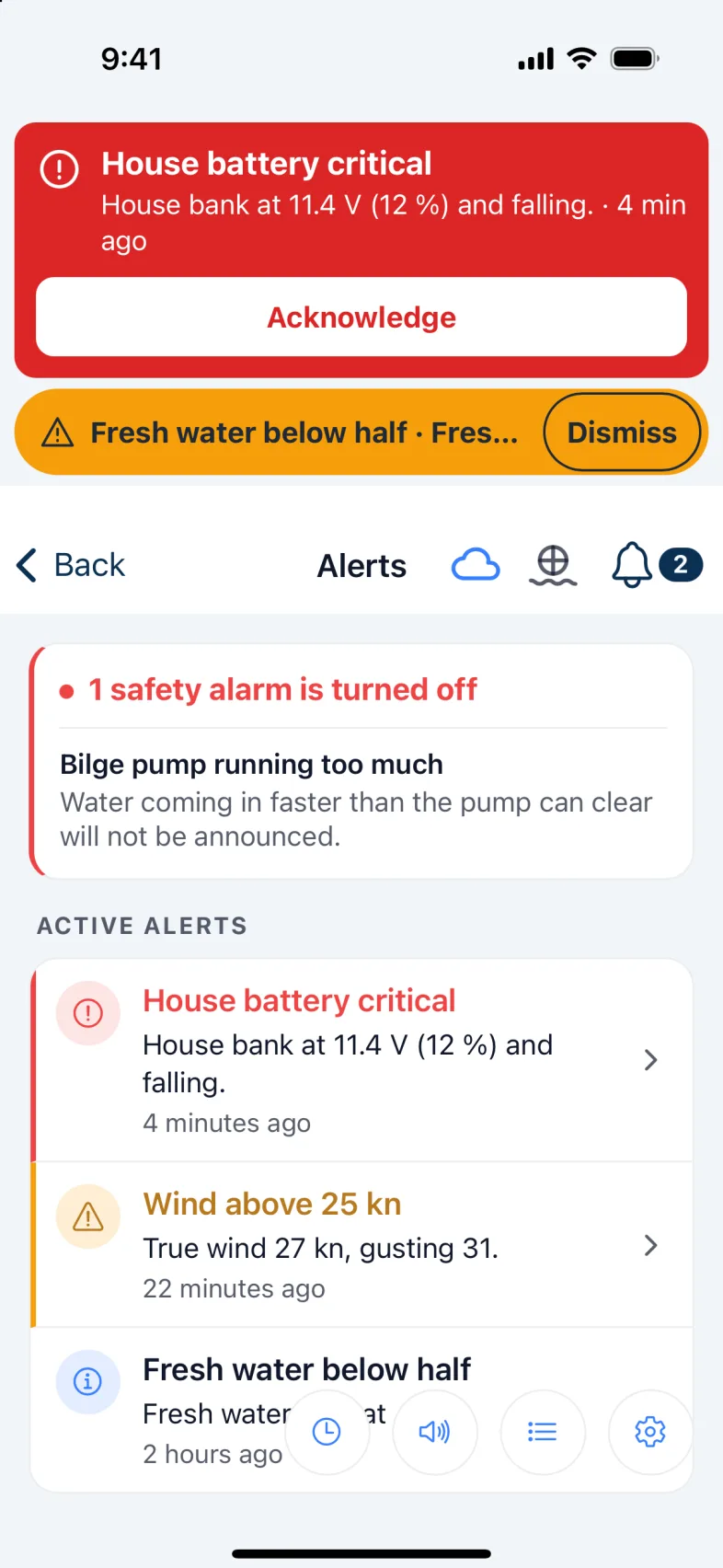
Wherever you are in the app, a sounding alarm shows across the top of the screen, with Silence 5 min and Acknowledge. A warning shows as a strip with Dismiss.
Who hears it
- Every phone with Nexus open hears the alarm, Direct or Cloud.
- A locked phone hears it only if the boat has internet: the marina's Wi-Fi or a phone's hotspot. The alarm then reaches every phone signed in to the boat, ashore as well as aboard. Red alerts that don't sound an alarm arrive as an ordinary notification.
- An Android phone keeps listening to the boat while the anchor is set, even with the screen off.
- The boat's speaker, if you have one, sounds the alarms on the boat, with or without internet.
- A boat too close reaches the watch, but never wakes a locked phone.
Warning: With no internet aboard, a locked iPhone won't hear the boat. Keep Nexus open on the screen, or plug a speaker into the Nexus unit.
Answering an alarm
- Acknowledge means "I've seen it". The alarm stops sounding for everyone aboard, the boat's speaker included, but the alert stays until the problem has gone. It won't sound again while that problem lasts. When the boat is back inside the anchor circle, say, it clears itself.
- Silence stops the sound on this phone only, for 1, 5 or 15 minutes: use the Silence button at the bottom of the Alerts screen, or the top of Alert settings. The banner's Silence 5 min is the quick way. A new alarm still sounds.
- Dismiss on a warning strip takes it off the banner. The warning stays on the Alerts screen.
- Dismiss inside an alert on the Alerts screen removes it for everyone. If the problem is still there, the boat raises it again.
Tap any alert on the Alerts screen to see what happened and when.
Warning: Acknowledge an alarm only once someone's dealing with it. It stops sounding for the whole crew.
How loud
Tap the settings button at the bottom of the Alerts screen to open Alert settings.
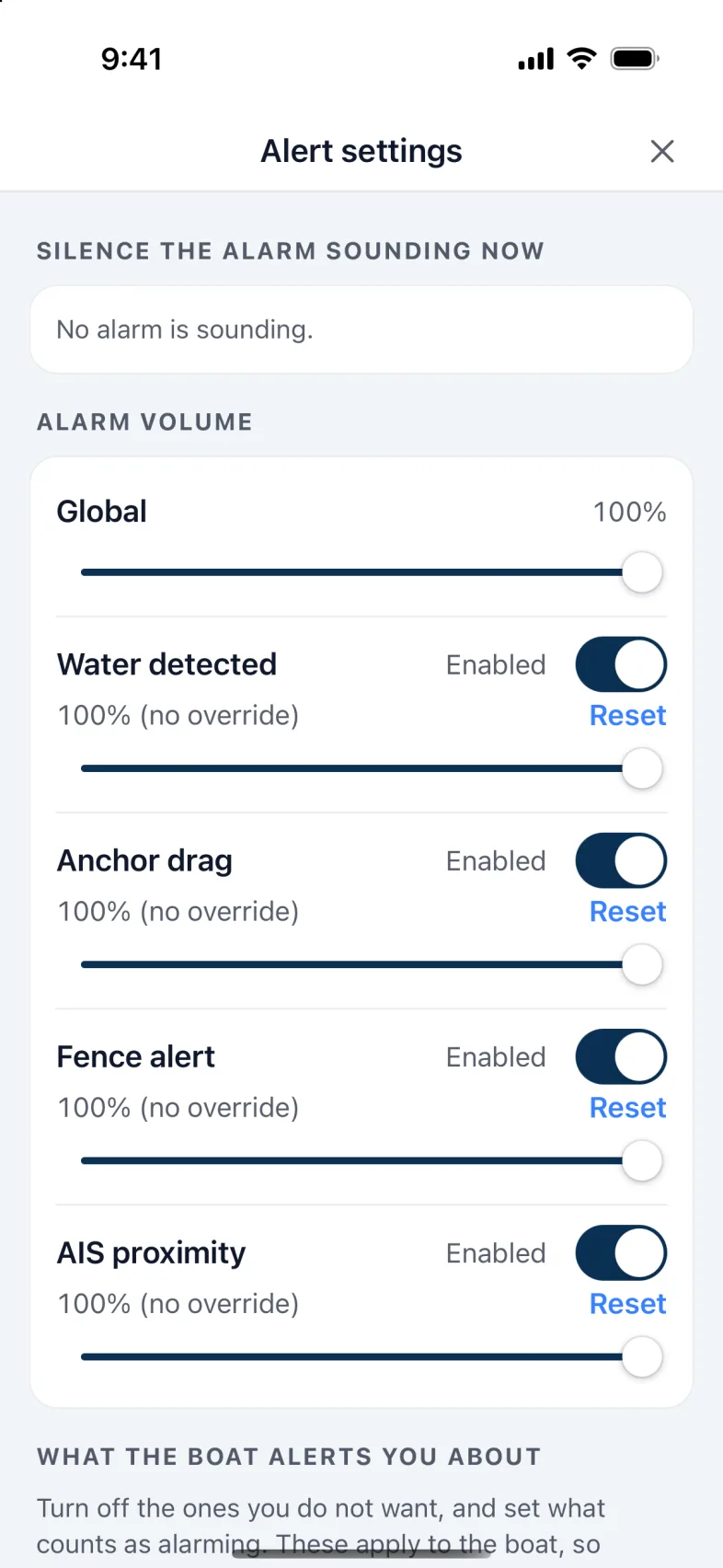
Under Alarm volume, the Global slider sets every alarm on this phone. Below it, each alarm (Water detected, Anchor drag, Fence alert and AIS proximity) has its own Enabled switch and slider, to turn it off or make it quieter than the rest. Reset puts it back with the rest.
Man overboard has no slider. It never plays at less than half volume, whatever the others are set to.
Note: Volumes belong to this phone. Your crew set their own. They apply while Nexus is open: on a locked phone, the alarm notification plays at full volume.
The boat's speaker
A USB speaker plugged into the Nexus unit sounds the same alarms as the phones, on the boat, with or without internet.
- Open Settings › Boat speaker. Alarms on the boat's speaker is on unless someone turned it off.
- Speaker volume sets how loud it is. An alarm never plays below 30%, and man overboard never below 50%.
- Play a test sound checks it.
Only Acknowledge stops the speaker. A phone's Silence quiets only that phone.
Which alerts you want
Further down Alert settings, under What the boat alerts you about, is everything the boat can warn you about. Turn off what you don't want, and set what counts: how low a battery, how close a boat, how far off course.
These belong to the boat, so the whole crew sees the same.
The safety alarms, such as a boat too close or a fence, can be turned off, but Nexus asks first and tells you what you'd lose. The Alerts screen then shows a red card listing every safety alarm that's off. Anchor dragging is always on.
Your own rules
Make an alert of your own from any reading: depth under the keel, speed, wind, temperature, pressure.
- On the Alerts screen, tap the rules button at the bottom, then + New rule.
- Give it a Rule name.
- Choose the Data source, the Operator (such as Less than), and the Threshold.
- Choose the Alert level (Info, Warning or Critical) and write the Alert message. Put {value} in the message to include the reading. Critical shows a red card and a notification, but no alarm sound.
- Under Hold time, Wait before alerting (seconds) is how long the condition must last before it alerts, 5 seconds unless you change it. It stops a single wave or gust setting it off.
- Tap Test rule to see whether it would go off right now, then Create rule.
A rule you make can be switched off, changed or deleted from the same list.
History
The history button shows every alert over the last day, week, month or six months: how often each one went off, for how long, and when. It's a good way to find an alarm that goes off too easily.
Tip: If one alarm keeps going off for a second or two, raise its threshold a little, or give your own rule a longer hold time. The history warns you if that would also have hidden a long one.
Version 1.1 · updated 2026-10-18