Raise a man overboard
The moment someone goes over:
- Tap MOB on the Home screen, or the lifebuoy at the top of any screen.
- Hold the red MOB button for two seconds, until it fires.
The boat marks where it is. Every phone with Nexus open sounds the alarm and switches to the man overboard screen, and so does the boat's speaker if you have one. A locked phone hears it only if the boat has internet.
Warning: The MOB button needs the phone to reach the boat, Direct or Cloud. If it says it can't reach the boat, use the radio straight away.
Warning: Nexus doesn't call for help. Use the radio: the man overboard screen shows the position to read out.
Getting back to them
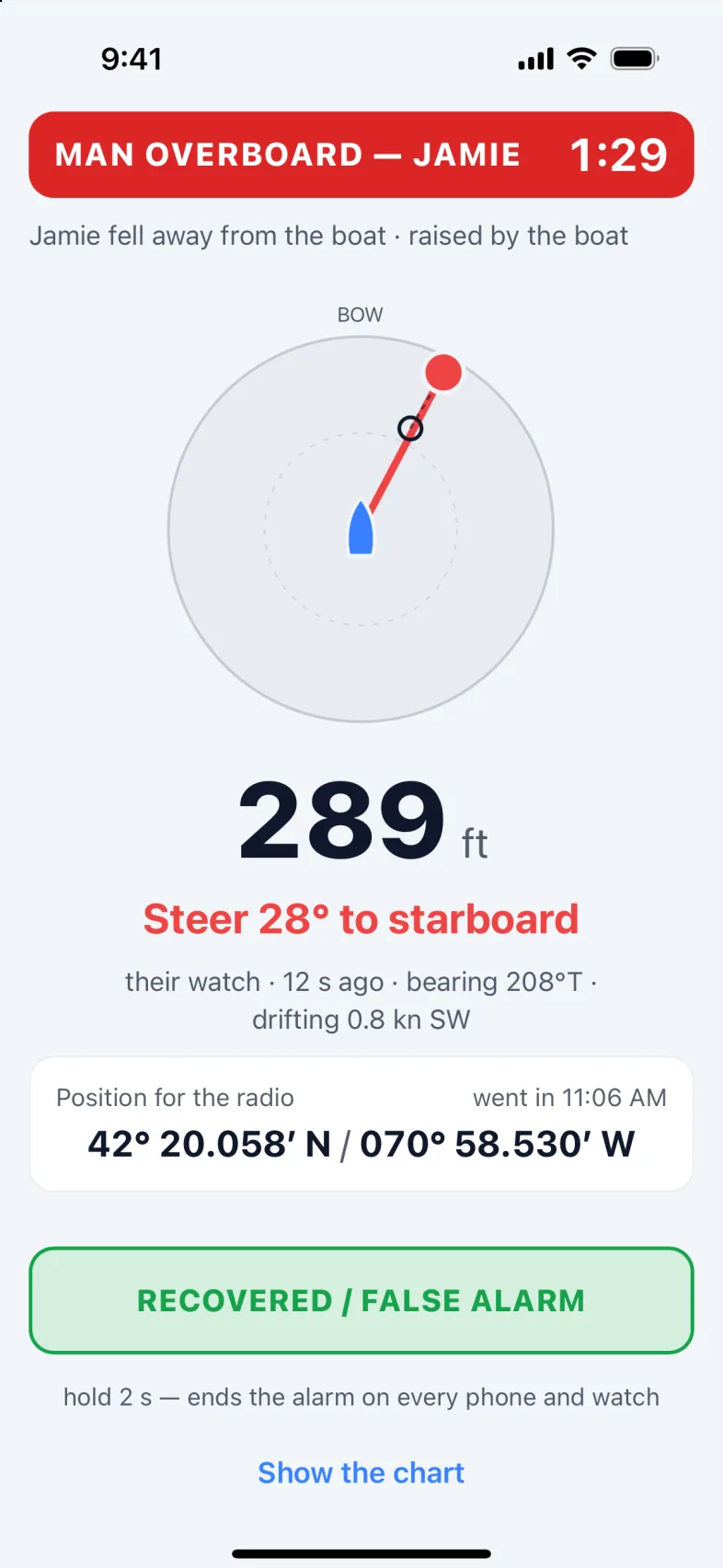
The man overboard screen shows:
- MAN OVERBOARD, the person's name if Nexus knows it, and how long ago it happened.
- An arrow to the person, the distance, and which way to steer: "Steer 40° to port", "Dead ahead".
- If they're wearing a watch that still reports, where they are now and which way they're drifting. Otherwise, where they went in.
- Position for the radio, and the time they went in.
If more than one person is in the water, tap a name to point the arrow at them.
Show the chart moves the screen aside on this phone; the alarm keeps sounding. The red lifebuoy at the top brings it back. Silence alarm 5 min quiets this phone only.
When they're back aboard
Hold RECOVERED / FALSE ALARM for two seconds. It ends the alarm on every phone and watch.
With more than one person overboard, tap the name of the one who's back, then hold SAM RECOVERED (with their name): the alarm carries on for the others. FALSE ALARM — END FOR EVERYONE ends it for all of them.
The automatic watch
Your crew's watches can raise a man overboard for you, when nobody has a hand free.
While the boat is under way, the boat keeps an eye on each crew watch:
- Left behind: a watch more than 40 metres from the boat and falling further behind. The watch counts down 15 seconds on the wrist, so the wearer can cancel, then raises the alarm.
- Gone quiet: a watch stops reporting without signing off.
Warning: From the water, only a watch with its own cellular connection, in coverage, can still reach the boat. Any other watch is caught by Gone quiet instead, about three minutes later.
The automatic watch arms after two minutes under way, stays armed for ten minutes after you stop, and is off at anchor. The Automatic watch card on the man overboard screen shows whether it's armed now, and a green dot on the lifebuoy at the top means it's armed.
Force on arms it straight away, for a short hop. It stays on, even at anchor, until you tap Automatic.
"Is Sam aboard?"
When a watch goes quiet or comes off a wrist while the automatic watch is armed, Nexus doesn't assume the worst. Every phone shows "IS SAM ABOARD?" with a countdown, 60 seconds unless you change it. Anyone can answer for everyone:
- Hold SAM IS ABOARD if they're fine.
- Hold NO — SAM IS OVERBOARD to raise the alarm at once.
The question itself doesn't sound an alarm. If nobody answers in time, the man overboard alarm sounds.
Note: A watch that's switched off or flat looks the same as one in the water. Sign off your watch, or answer the question, before you take it off.
An AIS man overboard beacon in range also raises the alarm, with its position. So does an AIS-SART, or an EPIRB with AIS.
Man overboard settings
Settings › Man overboard sets how the automatic watch behaves: how far is left behind, what to do when a watch goes quiet, and when to keep watch. It also has the AIS MOB beacon switch. These belong to the boat, so every phone and watch aboard follows them. Back to the recommended settings puts them back.
To turn the automatic watch off, for a haul-out or the boat on a trailer, turn off the On switch under Automatic man overboard there, and hold HOLD TO TURN OFF for three seconds. Keep it on changes your mind. It stays off until someone turns it back on.
The MOB button always works. AIS beacons work unless someone turned off AIS MOB beacon.
Version 1.1 · updated 2026-10-18