How the anchor watch works
When you anchor, you tell Nexus where the anchor is and how far the boat may swing: the alarm range. From then on the boat watches itself, all night, whether or not any phone is looking. If the boat stays outside the alarm range for 10 seconds, the boat raises Anchor Dragging.
The anchor watch is always on while the anchor is set. Dragging can't be switched off.
Making sure you hear it
The boat always knows when it drags. Whether you hear it depends on your phone:
- With Nexus open on the screen, your phone sounds the alarm. While the anchor is set, Nexus keeps the screen from going to sleep.
- A locked iPhone hears the alarm only if the boat has internet: the marina's Wi-Fi or a phone's hotspot.
- An Android phone keeps listening to the boat while the anchor is set, even with the screen off.
- A speaker plugged into the Nexus unit sounds the alarm on the boat, with or without internet. See Alerts.
Warning: At anchor with no internet, an iPhone that locks won't hear the boat. Leave the Anchor screen open beside your bunk, on the charger, or plug a speaker into the Nexus unit.
Warning: Before you rely on it, do the five-minute check in Before you rely on it, so the alarm can reach your phone. If it can't, the Anchor screen tells you, with a button to fix it.
If your phone loses touch with the boat while you're anchored, it plays one chime and the connection icon at the top blinks. That isn't the dragging alarm: it means this phone can't hear the boat right now.
Reading the screen
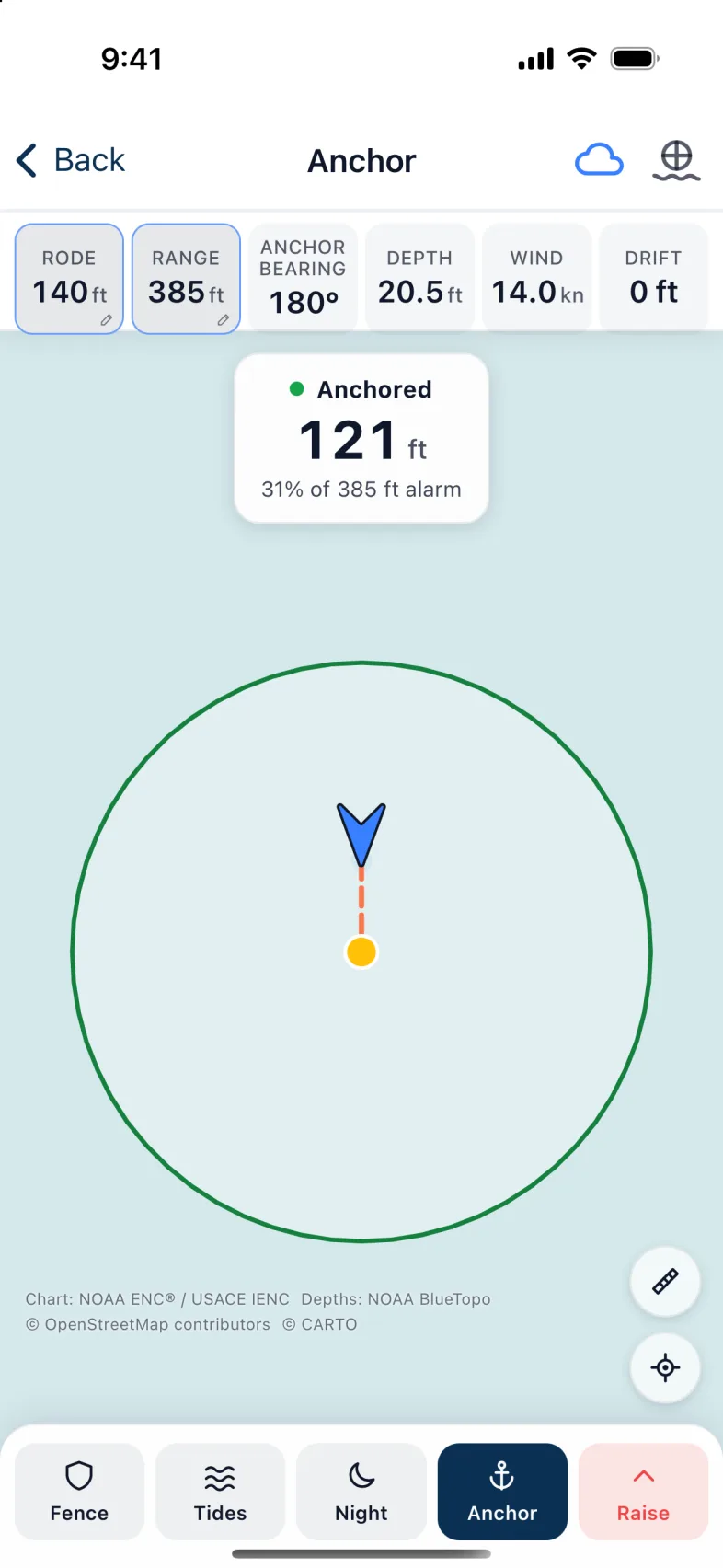
- The bar across the top: Rode (how much you let out), Range (the alarm range), Anchor bearing (the bearing to the anchor), Depth, Wind, and Drift. Drift is how far the anchor's mark has been moved since you set it. It does not measure dragging: for that, watch the status card.
- The status card on the chart: Not Anchored, Deploying, Anchored, DRAGGING, or AIS PROXIMITY WARNING. Anchored, it shows how far the boat is from the anchor, and how much of the alarm range that is: "31% of 385 ft alarm". This is the number to watch.
- The chart: the boat, the anchor, the alarm circle, and the boats around you. It uses the chart colours you chose in Display options.
- The buttons along the bottom: Fence, Tides, Night (once the anchor is down), Anchor, and Raise. A boat with a radar also has Radar.
Anchoring
The easiest way is to tell Nexus as the anchor goes down, and let it measure the rest while you back down.
- On the Anchor screen, tap Not Anchored ("Tap to drop anchor").
- Check the position and depth. The Rode calculator suggests how much rode to let out for the depth, the tide to come and your bow roller's height, at 3:1, 5:1 or 7:1 scope. It needs your bow roller's height, entered in the boat's details.
- As the anchor goes down, tap Drop anchor here. The card says Deploying.
- Let out the rode and back down. Nexus measures how far the boat swings.
- Tap Deploying. Check the bearing to the anchor, the Rode, the Alarm range and the AIS alert range, then tap Set anchor.
The card turns to Anchored, and the watch is on.
Warning: While the card says Deploying, nothing is watched yet. If you never finish, after 20 minutes the boat shows a red Anchor Not Monitored alert. It doesn't sound an alarm.
Already anchored?
If the anchor is already down, tap Anchor in the bottom bar and tell Nexus where it is:
- Set the Bearing to the anchor: type it, step it with − and +, or point the phone at the anchor and tap Use phone direction.
- Set the Rode you let out.
- Check the Alarm range. Leave it on Auto and Nexus uses the rode plus 20 feet (6 m), so the boat starts well inside the circle.
- Set the AIS alert range.
- Tap Set anchor.
The ranges
- Alarm range: how far from where the anchor went down the boat may go before the dragging alarm sounds. Too tight and the boat's normal swing sets it off; too loose and you'll learn late. Auto is a good start.
- AIS alert range: how close another boat may come before Nexus warns you. It starts very small, so set it each time you anchor.
Note: A boat too close sounds in the open app only. It won't wake a locked phone.
To change the alarm range while anchored, tap Range in the top bar; for the rode, tap Rode. Tap Anchor for all the settings, including the AIS alert range.
Fences
A fence warns you when the boat, or another boat, comes within a distance of something: a shoal, a mooring ball, or a neighbour who anchored too close.
Fences watch only while the anchor is set. Raising the anchor removes them.
- Tap Fence, then tap a spot on the chart, or a boat.
- In New fence, give it a Name and an Alert range, and choose what it's Measured from: The boat, The anchor drop or The anchor's position.
- Tap Save fence.
Once you have a fence, Fence opens your list of Fences: tap Add a fence for another, or remove one.
At night
Tap Night for a dim red screen that keeps your night vision: just the distance from the anchor, and Holding or DRAGGING. Tap anywhere, or Full view, to go back.
Tip: Leave the Anchor screen open beside your bunk, on the charger. While the anchor is set, Nexus keeps the screen awake, and with the app open your phone hears the boat with or without internet.
On an iPhone, while you're anchored, the Lock Screen shows an anchor card with the distance from the anchor. It turns red if the anchor drags, when the boat has internet.
If the alarm sounds
- Look outside, and check the chart: is the boat really moving?
- Tap Acknowledge to stop the alarm for everyone aboard, the boat's speaker included. It won't sound again for this drag, so acknowledge only once someone's dealing with it. Silence 5 min quiets only this phone. A new alarm still sounds.
- If the anchor has dragged and reset, and you're staying, tap the status card, then Reset anchor here. Nexus marks the anchor where the boat is now and keeps the alarm range.
Raising the anchor
Tap Raise, then Raise anchor. This ends the anchor watch and clears the rode, ranges and fences. It stops only the anchor alarms: a man overboard alarm is never stopped this way.
If the anchor reset somewhere new and you're staying, choose Re-mark the anchor here instead, then Yes, update. Nexus marks the anchor where the boat is now and keeps the alarm range.
While the card still says Deploying, Raise asks Abort anchor drop? instead: Abort drop ends the drop, Keep deploying carries on.
Version 1.1 · updated 2026-10-18